
Capsule Weight Variation Test Calculator
% Deviation = (Individual Weight − Average Weight) / Average Weight × 100
✅ Pass: % Deviation between -10% and +10%
❌ Fail: % Deviation below -10% or above +10%
💊 Capsule Compounding Quality Control Sheet | Weight Variation Test
🔧 Compounding Inputs
Individual Capsule Weights
📊 Instant Results
Observation Table Unit:
📐 Step by Step Calculation Show in:
Real-time-all formulas update instantly.
How to Use This Calculator (Step-by-step)
Step 1: Fill in the basic info
- Enter how many capsules you want to make (example: 100).
- Put the total weight of empty capsules (if using grams or mg, pick from the dropdown).
- Put the total weight of all ingredients (powder, filler, etc.). Again pick grams or mg.
Step 2: Enter each capsule’s weight
- You’ll see 10 boxes for Capsule 1 to Capsule 10.
- Type the weight of each filled capsule. You can use grams or mg – just pick the unit from the dropdown above the boxes.
- Don’t worry if you mess up, the calculator updates by itself. No buttons to press.
Step 3: Look at the results
- On the left side, you’ll see “Instant Results” showing the average weight of empty and filled capsules. It shows both grams and mg so you can compare.
- On the right side, there’s a table. It shows each capsule’s weight, how much it differs from the average, the percentage difference, and if it Passes or Fails.
- Green = Good (within 10% of average)
- Red = Fail (more than 10% above or below)
- Orange = Negative difference (lighter than average)
Step 4: Switch between grams and mg
- Above the observation table, you can pick “grams” or “mg” to see weights in the unit you like.
- Same for the “Step by Step Calculation” box – just pick your favorite unit and the numbers change automatically.
Step 5: Read the step-by-step math
- The right side also shows you exactly how every number was calculated. It writes out the formulas like:
Average = Total weight ÷ Number of capsules
% Deviation = (Your capsule weight − Average) ÷ Average × 100
This helps you double-check or understand where each number is coming from.
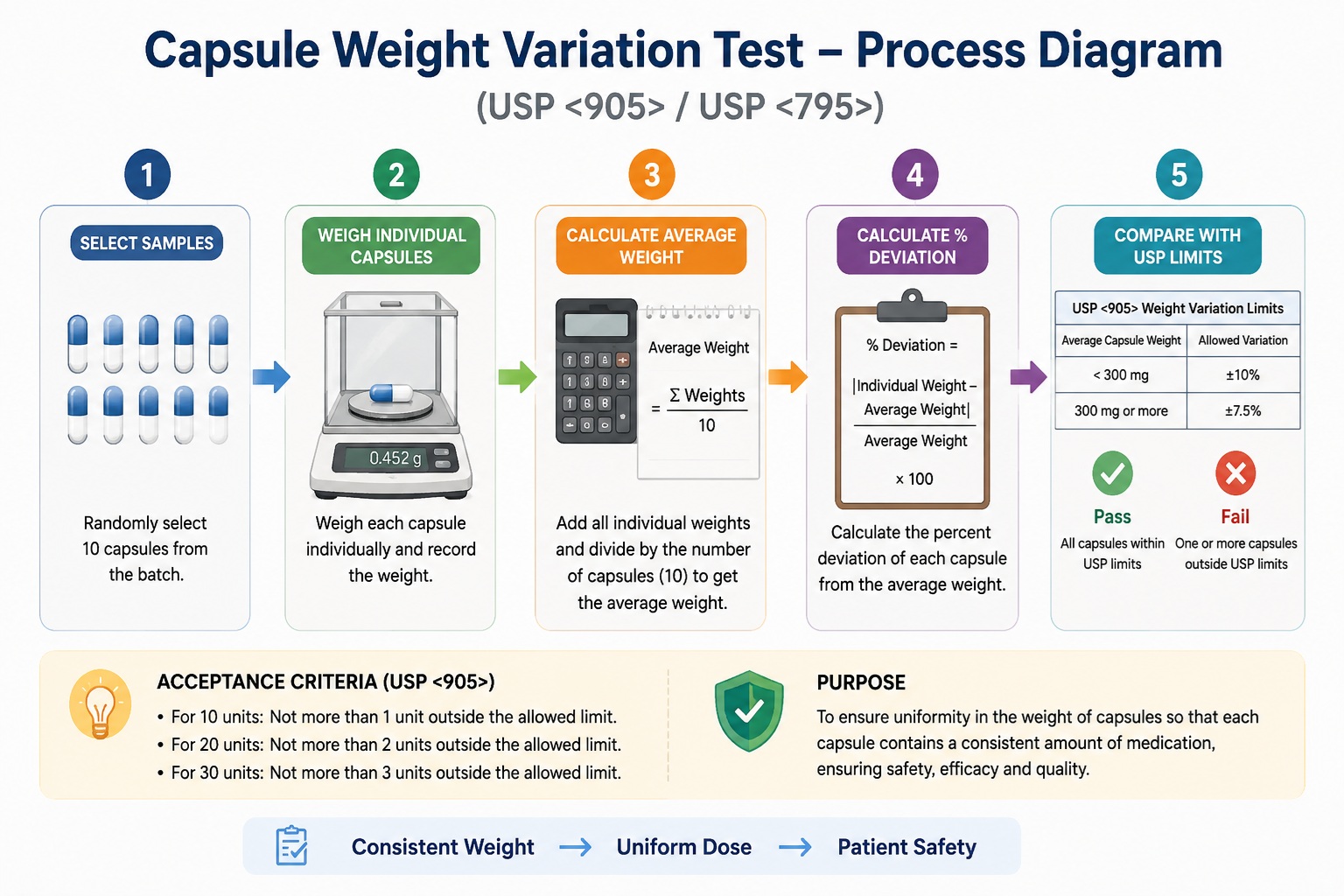
What the calculator does
Our calculator checks if your filled capsules are all close to the same weight. You just type in the total weight of empty capsules, total weight of all ingredients, and the weight of 10 randomly selected, individual capsules. It shows the average and how much each capsule differs.
If the % deviation goes beyond 10%, it means the capsule is either too light or too heavy. In real compounding, that usually means the powder wasn’t mixed evenly, the machine didn’t fill correctly, or some ingredients settled differently. A fail means that capsule might not have the right dose of medicine.
Who it’s for (pharmacists, students, technicians)
It’s for anyone who makes capsules in a pharmacy, lab, or school.
- Pharmacists use it to check their compounding work at the pharmacy before dispensing medicine to patients.
- Pharmacy students use it to learn how to do weight tests the right way.
- Technicians use it to save time and avoid math mistakes.
Even small pharmacy owners can use it daily without being a math expert. You don’t need to remember any formulas with our calculator, just type the numbers and the calculator does the rest for you.
Why it matters (USP compliance)
In the US, there is a rulebook called USP (United States Pharmacopeia).
- According to USP when you make capsules, no more than 2 out of 10 capsules can be outside the 90% to 110% weight range.
- If too many capsules fail, the whole batch is bad and cannot be given to patients.
This calculator helps you follow that rule without guessing. It catches failures instantly so you can fix your process before it’s too late. It keeps patients safe and your pharmacy out of trouble.
Source: USP General Chapter <905> on Uniformity of Dosage Units
What is the Capsule Weight Variation Test & Why USP Requires It?
The capsule weight variation test is a simple way to check if all capsules in a batch have almost the same weight. You pick 10 random capsules, weigh each one, and see how much they differ from the average.
The purpose is to make sure every capsule has the same amount of medicine. This is called “uniformity of dosage units”. The fancy words meaning is that no capsule gives too much or too little drug. USP, which is the official rulebook for medicines in America, requires this test because patients depend on the same dose every time. If one capsule is too light or too heavy, it can hurt someone or not work at all. Following USP keeps people safe.
USP <905> Weight Variation Limits for Capsules
The USP <905> guideline explains how much difference is allowed between the weights of capsules in the same batch. This helps make sure every capsule has almost the same amount of medicine.
- First, you find the average weight of all capsules. Then, you compare each capsule to that average.
- If a capsule weighs less than 300 mg, it can vary by up to ±10%.
- If it weighs 300 mg or more, the allowed variation is smaller, which is ±7.5%.
- This is because larger capsules should be more consistent.
If too many capsules go outside this limit, the batch can fail the test. This is important for patient safety and correct dosing.
| Average Capsule Weight | Allowed Variation | What It Means |
| Less than 300 mg | ±10% | Small capsules can vary a little more |
| 300 mg or more | ±7.5% | Larger capsules must be more accurate |
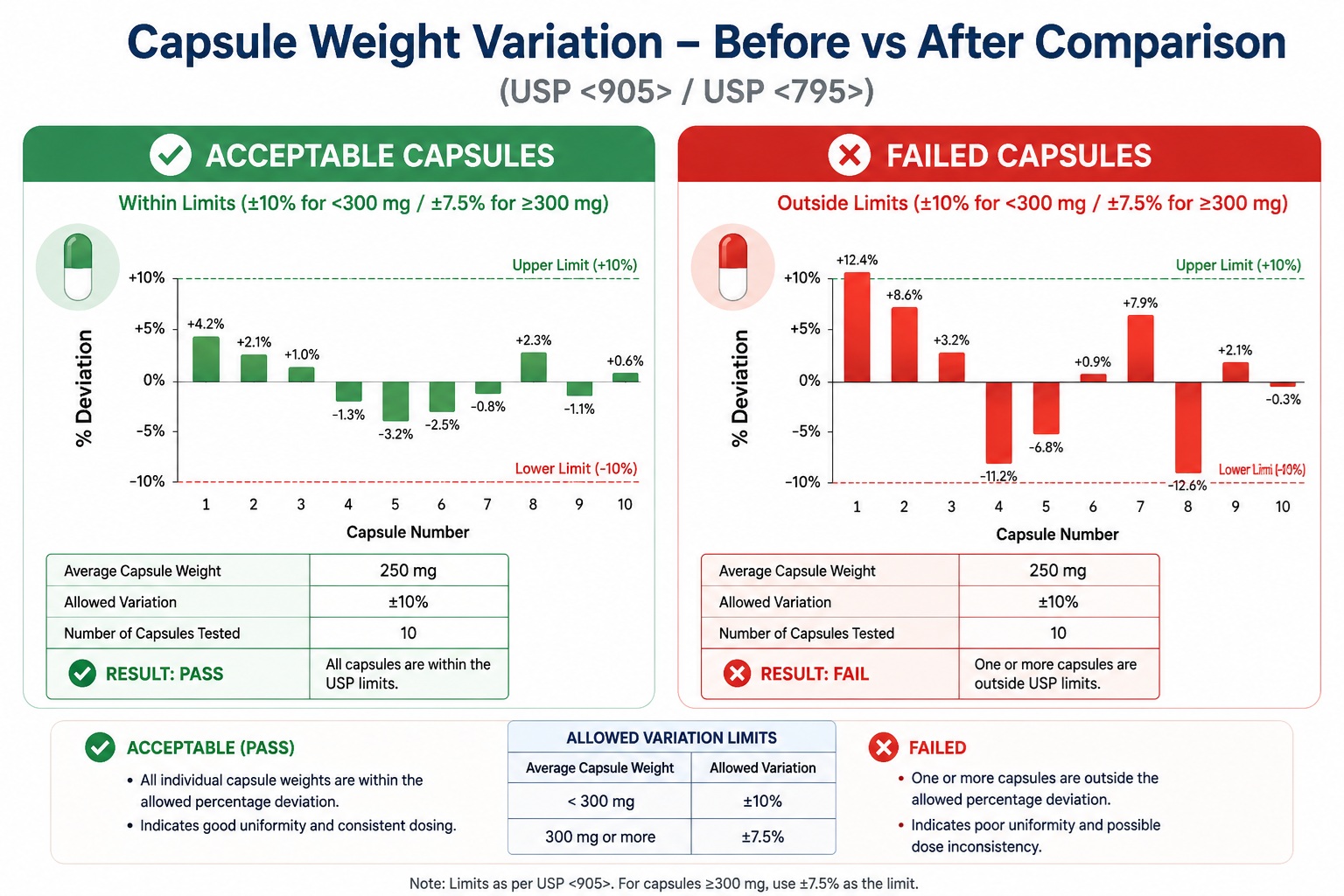
Real Life Example – Capsule Weight Variation Test
Question:
A pharmacy technician makes 100 capsules. The total weight of 100 empty capsules is 3.1 grams. The total weight of all ingredients (the medicine powder) is 29.6 grams. The technician weighs 10 randomly filled capsules. Do all capsules pass the USP weight variation test?
Given Data:
- Total Number of Capsules = 100
- Total Weight of Empty Capsules = 3.1 g
- Total Weight of All Ingredients = 29.6 g
Individual Capsule Weights (g):
- Capsule 1: 0.328
- Capsule 2: 0.339
- Capsule 3: 0.299
- Capsule 4: 0.289
- Capsule 5: 0.340
- Capsule 6: 0.348
- Capsule 7: 0.356
- Capsule 8: 0.366
- Capsule 9: 0.299
- Capsule 10: 0.318
Answer:
Average Weight (Empty Capsule)
Formula Used = Total Weight of Empty Capsules ÷ Total Number of Capsules
= 3.1 g ÷ 100 = 0.031 g
Average Weight (Filled Capsule)
Formula Used = (Total Weight of Empty Capsules + Total Weight of All Ingredients) ÷ Total Number of Capsules
= (3.1 g + 29.6 g) ÷ 100 = 32.7 g ÷ 100 = 0.327 g
Find Deviation for Each Capsule:
Formula Used: Individual Weight − Average Filled Weight
- Example for Capsule 1: 0.328 − 0.327 = +0.001 g
- Example for Capsule 4: 0.289 − 0.327 = -0.038 g
Find % Deviation for Each Capsule:
Formula Used: (Deviation ÷ Average Filled Weight) × 100
- Example for Capsule 1: (0.001 ÷ 0.327) × 100 = +0.31%
- Example for Capsule 4: (-0.038 ÷ 0.327) × 100 = -11.62%
Decide Pass or Fail
Rule: Pass if % Deviation is between -10% and +10%. Fail if below -10% or above +10%.
- Capsule 4: -11.62% is less than -10% → Fail
- Capsule 8: +11.93% is more than +10% → Fail
- All others are within ±10% → Pass
Observation Table
| Capsule No. | Individual Weight (g) | Deviation (g) | % Deviation | Status |
| 1 | 0.328 | 0.001 | 0.0031 | Pass |
| 2 | 0.339 | 0.012 | 0.0367 | Pass |
| 3 | 0.299 | -0.028 | -8.56% | Pass |
| 4 | 0.289 | -0.038 | -11.62% | Fail |
| 5 | 0.34 | 0.013 | 0.0398 | Pass |
| 6 | 0.348 | 0.021 | 0.0642 | Pass |
| 7 | 0.356 | 0.029 | 0.0887 | Pass |
| 8 | 0.366 | 0.039 | 0.1193 | Fail |
| 9 | 0.299 | -0.028 | -8.56% | Pass |
| 10 | 0.318 | -0.009 | -2.75% | Pass |
Result: 8 capsules Pass, 2 capsules Fail. According to USP rules, if more than 2 capsules fail, the whole batch fails. So this batch does NOT pass.
Why Weight Variation Test is Important
Patient Safety
If one capsule has too much medicine, a patient could get sick or have bad side effects. If another capsule has too little medicine, the patient might not get better. The weight variation test catches these problems before the medicine ever reaches the patient. It protects people from getting hurt.
Dose Accuracy
Every patient expects the same amount of medicine in each capsule. The test makes sure that the powder is mixed evenly and the filling machine works right. If weights are different, it means some capsules have more drug and some have less. That is not fair to the patient and can make the medicine fail to work properly.
Regulatory Compliance
The USP (United States Pharmacopeia) is the official rulebook for medicines in America. It clearly says you must do this test. If a pharmacy or company skips the test and gets caught, they can face fines, lose their license, or even get sued. Following the rule keeps you out of trouble and shows you care about quality.
Frequently Asked Questions (FAQs)
1. What is weight variation test for capsules?
The weight variation test checks if all capsules in a batch have nearly the same weight. It helps make sure each capsule has the correct amount of medicine and is safe for patients.
2. What is USP <905>?
USP <905> is a guideline from the United States Pharmacopeia. It explains how to test the uniformity of dosage units like capsules and tablets to make sure they meet quality standards.
3. How many capsules are tested in weight variation test?
Usually, 10 capsules are tested first. If the results are not within limits, more capsules may be tested as per USP guidelines.
4. What is acceptable variation for capsules?
For capsules less than 300 mg, the allowed variation is ±10%. For capsules 300 mg or more, the allowed variation is ±7.5%.
5. What happens if capsules fail weight variation test?
If too many capsules are outside the allowed limit, the batch fails the test. It may need to be rejected or rechecked before use.
6. Why is weight variation test important?
This test is important because it ensures correct dosing. It helps protect patients by making sure every capsule has a uniform amount of medicine.
7. How do you calculate capsule weight variation?
First, calculate the average weight of all capsules. Then find the difference between each capsule and the average. Finally, calculate the percentage deviation.
8. What is the formula for weight variation?
The formula is: % Deviation = (|Individual Weight − Average Weight| ÷ Average Weight) × 100.
9. Who should use capsule weight variation calculator?
Pharmacists, pharmacy students, and compounding technicians can use this calculator to quickly check if capsules meet USP standards.
10. What is the difference between weight variation and content uniformity?
Weight variation checks the total weight of capsules, while content uniformity checks the actual amount of drug inside each capsule.
References
-
USP General Chapter <795> – Pharmaceutical Compounding (Nonsterile Preparations)
This guideline explains standards for nonsterile compounding practices, including capsule preparation, quality control, and consistency requirements in pharmacy compounding.
-
FDA Guidance – Content Uniformity Testing for Capsules and Tablets
This FDA document explains regulatory expectations for capsule and tablet uniformity testing to ensure accurate dosing and patient safety.
-
Pharmacy Educational Resource – Weight Variation & Content Uniformity (USP / EP / IP)
This educational resource explains the difference between weight variation and content uniformity and how they are applied in pharmaceutical quality control.
About the Author
Adesh Pundir, RPh (Texas Licensed Pharmacist) is a licensed pharmacist in the state of Texas with experience in community pharmacy and sterile & non-sterile compounding practices. He specializes in pharmacy calculations, USP <795> compounding standards, and quality control processes including capsule weight variation and dosage uniformity testing.
He is focused on improving pharmacy accuracy, patient safety, and simplifying complex USP guidelines for pharmacy technicians, students, and healthcare professionals.
Credentials: Licensed Pharmacist (RPh), Texas Board of Pharmacy | Experience in Compounding Pharmacy & Clinical Dispensing